Automate Sales Tax with Kintsugi and QuickBooks
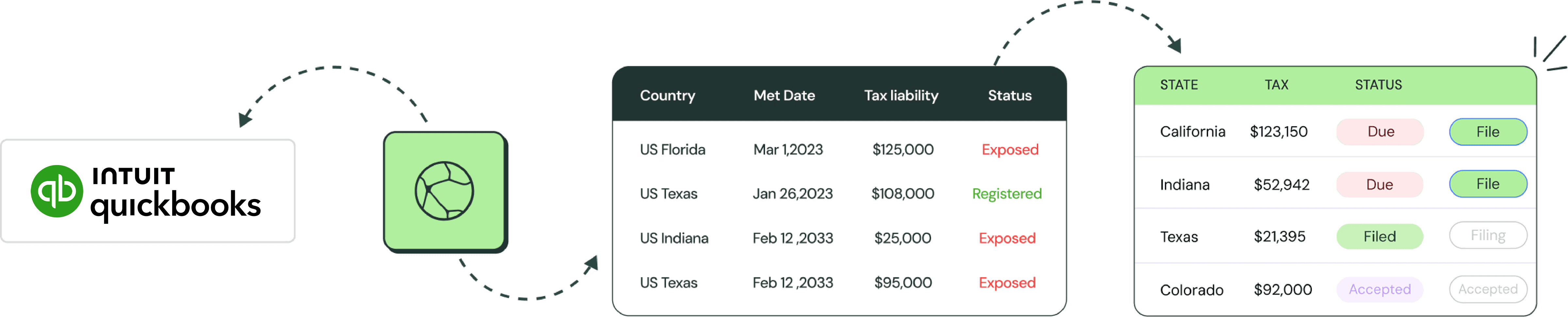
Kintsugi reads your QuickBooks data, calculates exact tax liability, pushes it back to your ledger, and files in every state automatically. You stay focused on actually running your business.
Join 6,000+ businesses using Kintsugi
"Kintsugi really does take care of everything once your accounts are synced. It automatically calculates and breaks down sales tax by platform and state."
80%
reduction in compliance time

"With Kintsugi, we’ve been able to expand into more markets without worrying about tax compliance. The platform grows with us, and that gives us the confidence to keep scaling."
90%
time savings on compliance

"With Kintsugi, we’ve been able to expand into more markets without worrying about tax compliance. The platform grows with us, and that gives us the confidence to keep scaling."
38%
reduction in compliance costs

"Kintsugi really does take care of everything once your accounts are synced. It automatically calculates and breaks down sales tax by platform and state."
80%
reduction in compliance time
"With Kintsugi, we’ve been able to expand into more markets without worrying about tax compliance. The platform grows with us, and that gives us the confidence to keep scaling."
90%
time savings on compliance
"With Kintsugi, we’ve been able to expand into more markets without worrying about tax compliance. The platform grows with us, and that gives us the confidence to keep scaling."
38%
reduction in compliance costs
"Kintsugi really does take care of everything once your accounts are synced. It automatically calculates and breaks down sales tax by platform and state."
80%
reduction in compliance time
"With Kintsugi, we’ve been able to expand into more markets without worrying about tax compliance. The platform grows with us, and that gives us the confidence to keep scaling."
90%
time savings on compliance
"With Kintsugi, we’ve been able to expand into more markets without worrying about tax compliance. The platform grows with us, and that gives us the confidence to keep scaling."
38%
reduction in compliance costs
"Kintsugi really does take care of everything once your accounts are synced. It automatically calculates and breaks down sales tax by platform and state."
80%
reduction in compliance time
"With Kintsugi, we’ve been able to expand into more markets without worrying about tax compliance. The platform grows with us, and that gives us the confidence to keep scaling."
90%
time savings on compliance
"With Kintsugi, we’ve been able to expand into more markets without worrying about tax compliance. The platform grows with us, and that gives us the confidence to keep scaling."
38%
reduction in compliance costs
"Kintsugi really does take care of everything once your accounts are synced. It automatically calculates and breaks down sales tax by platform and state."
80%
reduction in compliance time
"With Kintsugi, we’ve been able to expand into more markets without worrying about tax compliance. The platform grows with us, and that gives us the confidence to keep scaling."
90%
time savings on compliance
"With Kintsugi, we’ve been able to expand into more markets without worrying about tax compliance. The platform grows with us, and that gives us the confidence to keep scaling."
38%
reduction in compliance costs
"Kintsugi really does take care of everything once your accounts are synced. It automatically calculates and breaks down sales tax by platform and state."
80%
reduction in compliance time
"With Kintsugi, we’ve been able to expand into more markets without worrying about tax compliance. The platform grows with us, and that gives us the confidence to keep scaling."
90%
time savings on compliance
"With Kintsugi, we’ve been able to expand into more markets without worrying about tax compliance. The platform grows with us, and that gives us the confidence to keep scaling."
38%
reduction in compliance costs
"Kintsugi really does take care of everything once your accounts are synced. It automatically calculates and breaks down sales tax by platform and state."
80%
reduction in compliance time
"With Kintsugi, we’ve been able to expand into more markets without worrying about tax compliance. The platform grows with us, and that gives us the confidence to keep scaling."
90%
time savings on compliance
"With Kintsugi, we’ve been able to expand into more markets without worrying about tax compliance. The platform grows with us, and that gives us the confidence to keep scaling."
38%
reduction in compliance costs
"Kintsugi really does take care of everything once your accounts are synced. It automatically calculates and breaks down sales tax by platform and state."
80%
reduction in compliance time
"With Kintsugi, we’ve been able to expand into more markets without worrying about tax compliance. The platform grows with us, and that gives us the confidence to keep scaling."
90%
time savings on compliance
"With Kintsugi, we’ve been able to expand into more markets without worrying about tax compliance. The platform grows with us, and that gives us the confidence to keep scaling."
38%
reduction in compliance costs
Full-stack sales tax automation built for QuickBooks
Bidirectional data sync
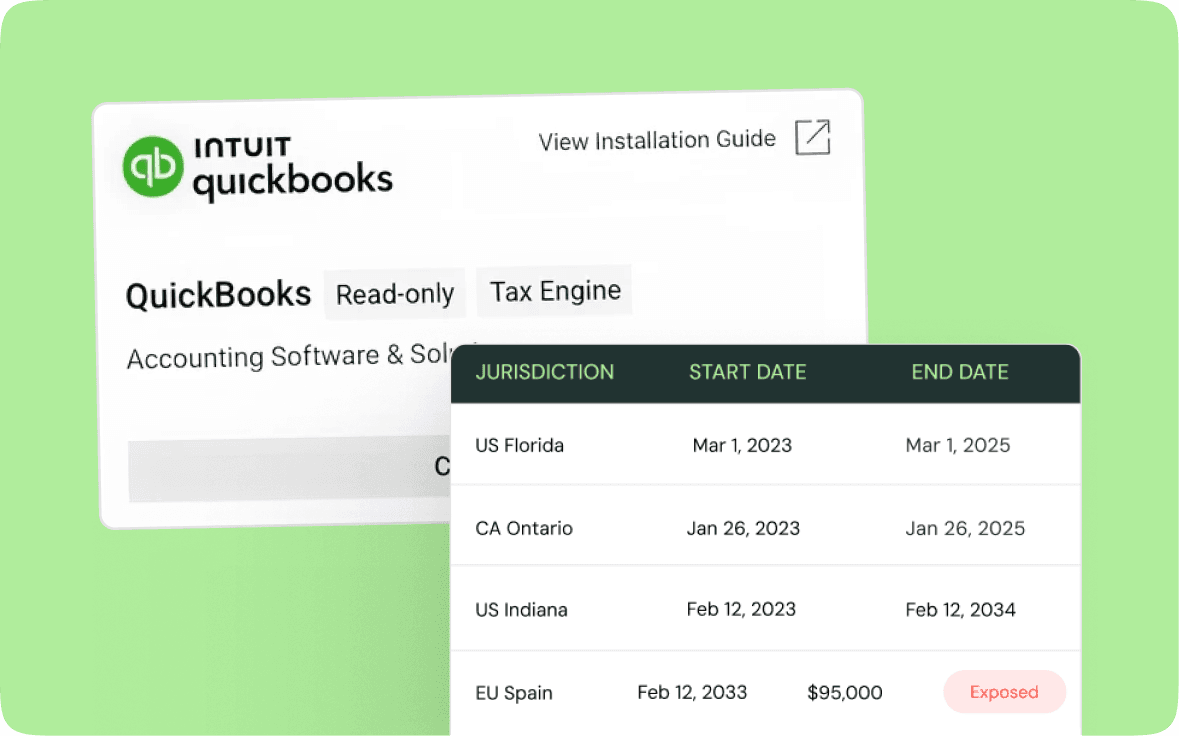
Pull sales and transaction history instantly. Push calculated taxes back into invoices and general ledger entries.
Nexus tracking and alerts
State filing on autopilot
Smart product classification
Bidirectional data sync
Pull sales and transaction history instantly. Push calculated taxes back into invoices and general ledger entries.
Nexus tracking and alerts
State filing on autopilot
Smart product classification
193
million transactions
$15.1B
billion transaction value processed
6,000+
customers across 106 countries
<2 hours
average support response
Sales tax automation designed for QuickBooks users
Expert support included
Our support team has filed in every state. They know the quirks, the edge cases, the random requirements.

Keep your current setup
Continue using QuickBooks exactly as you do today. Nothing changes except Sales tax automation designed for QuickBooks users.

Predictable pricing
Flat $75 per filing. That's it. Not a percentage of tax. Simple, predictable pricing that makes sense.

Start your path to sales tax compliance
See exactly where you stand with sales tax compliance and what it takes to get fully compliant with a personalized demo.
FAQs
What kind of integration does Kintsugi have with QuickBooks?
Kintsugi has a read-write integration with QuickBooks. We pull transaction data to calculate taxes, then push that tax information back into your invoices and ledger. This enables fully automated tax handling within your existing QuickBooks workflow.
What kind of integration does Kintsugi have with QuickBooks?
Kintsugi has a read-write integration with QuickBooks. We pull transaction data to calculate taxes, then push that tax information back into your invoices and ledger. This enables fully automated tax handling within your existing QuickBooks workflow.
How does the QuickBooks connection work?
Go to Data Sources in your Kintsugi dashboard. Click Browse Integrations, find QuickBooks, and click Connect. You'll be redirected to QuickBooks to authorize the connection. Takes about 2 minutes total.
How does the QuickBooks connection work?
Go to Data Sources in your Kintsugi dashboard. Click Browse Integrations, find QuickBooks, and click Connect. You'll be redirected to QuickBooks to authorize the connection. Takes about 2 minutes total.
Does this replace QuickBooks' built-in sales tax features?
It enhances them. QuickBooks still displays tax on invoices, but now with accurate, real-time rates from Kintsugi. We handle the complex calculation rules, multi-state compliance, and automatic filing that QuickBooks doesn't do.
Does this replace QuickBooks' built-in sales tax features?
It enhances them. QuickBooks still displays tax on invoices, but now with accurate, real-time rates from Kintsugi. We handle the complex calculation rules, multi-state compliance, and automatic filing that QuickBooks doesn't do.
Will this sync my existing QuickBooks products and customers?
Yes. Kintsugi reads your existing QuickBooks items, customers, and transaction history. We classify products for tax purposes and apply the correct rates based on customer location—all synced automatically.
Will this sync my existing QuickBooks products and customers?
Yes. Kintsugi reads your existing QuickBooks items, customers, and transaction history. We classify products for tax purposes and apply the correct rates based on customer location—all synced automatically.
What if I have multiple QuickBooks companies?
Each QuickBooks company can be connected as a separate data source in Kintsugi. Manage all your entities from one Kintsugi dashboard with separate filings for each.
What if I have multiple QuickBooks companies?
Each QuickBooks company can be connected as a separate data source in Kintsugi. Manage all your entities from one Kintsugi dashboard with separate filings for each.
Can I still use QuickBooks for invoicing and payments?
Absolutely. Kintsugi doesn't change how you create invoices or collect payments in QuickBooks. We just make sure the tax is calculated correctly and filed automatically.
Can I still use QuickBooks for invoicing and payments?
Absolutely. Kintsugi doesn't change how you create invoices or collect payments in QuickBooks. We just make sure the tax is calculated correctly and filed automatically.
How is this different from using QuickBooks' native tax features?
QuickBooks provides basic tax calculation but requires manual setup for each jurisdiction and doesn't file returns for you. Kintsugi automates calculation across 13,000+ jurisdictions, monitors nexus, and handles filing and remittance in every state.
How is this different from using QuickBooks' native tax features?
QuickBooks provides basic tax calculation but requires manual setup for each jurisdiction and doesn't file returns for you. Kintsugi automates calculation across 13,000+ jurisdictions, monitors nexus, and handles filing and remittance in every state.